
Did You Know?
Save time. Work smarter
Save time. Work smarter






Accidentally deleting an important Instagram chat can feel stressful and overwhelming. Whether it was a business conversation, customer order details, partnership discussion, or personal memories, losing access to messages often creates panic. Many people immediately search online for “Instagram message recovery” hoping to find a quick fix. Unfortunately, the internet is filled with misleading apps, fake recovery tools, and unsafe methods that promise instant results.
The truth is simple: Instagram does not provide a direct restore button inside the app. However, there is an official and legitimate way to check whether your deleted chats are still stored in your account data. In this guide, you’ll learn the real method, what actually works, what doesn’t work, and how to protect yourself from scams. Everything is explained clearly so you can follow each step confidently and safely.
You cannot restore deleted Instagram chats directly inside the app. Once a chat is deleted, it disappears from your inbox.
However, by using Instagram’s data export feature, you can download a copy of your messages. If your deleted chat is still stored in Instagram’s archive, you can view it in the exported file. If the messages do not appear in the export, they are permanently deleted and cannot be recovered.
Recovering deleted Instagram chats is only possible through Instagram’s official data export feature. Follow these steps carefully.

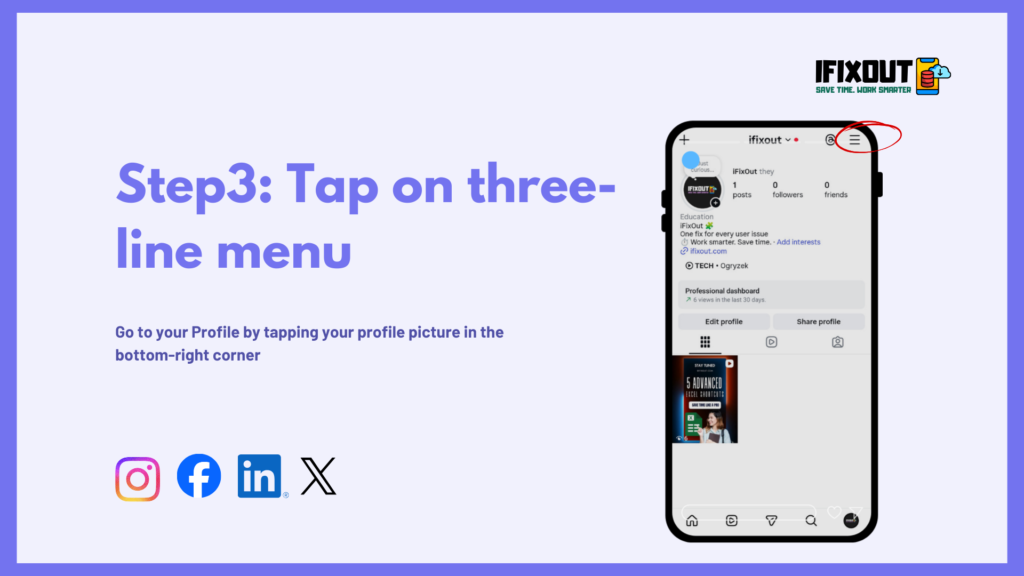
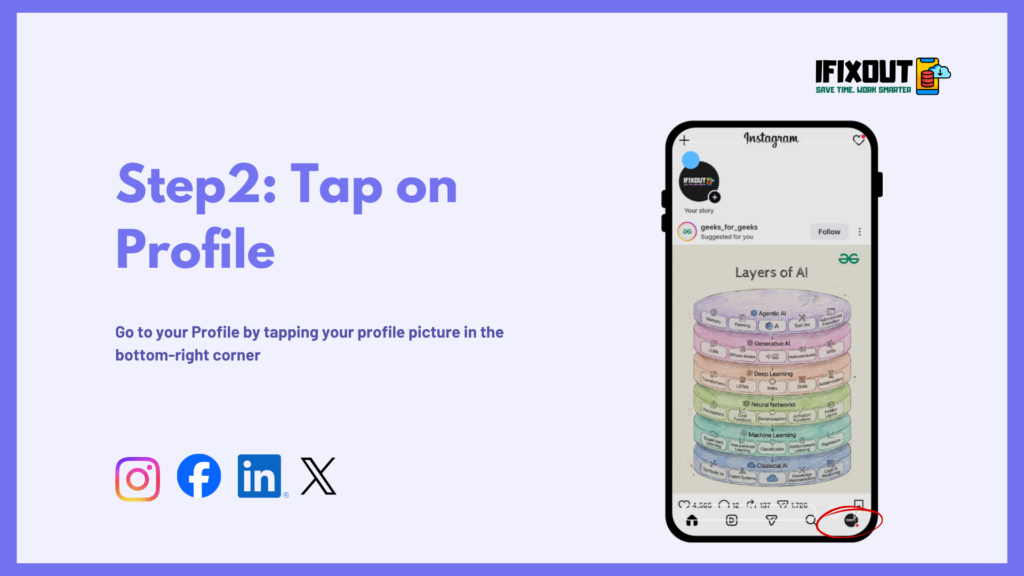

Account Center is where Instagram keeps your personal information and settings, including options to download your data.

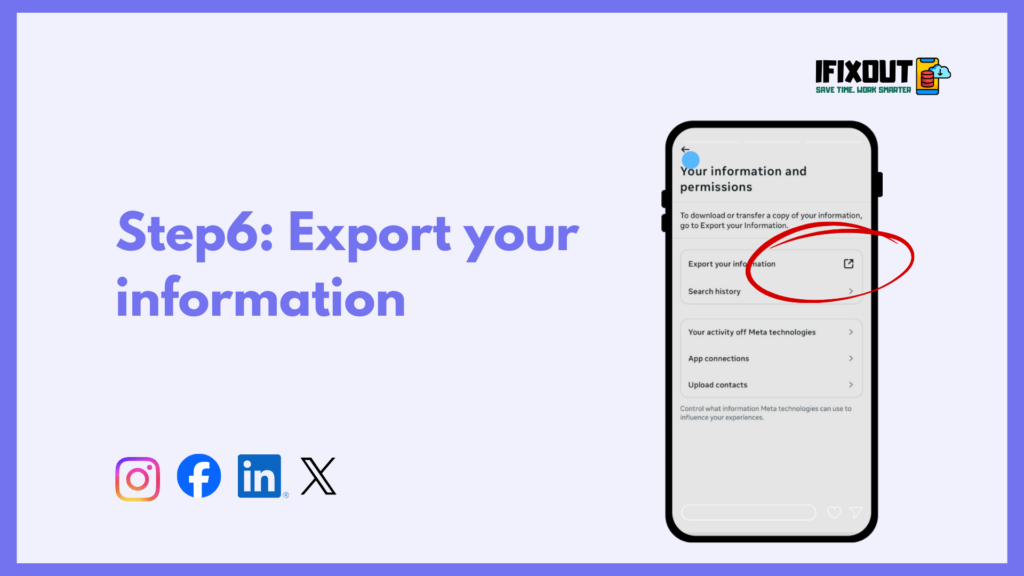

Instagram will now ask what type of information you want to include in your download.
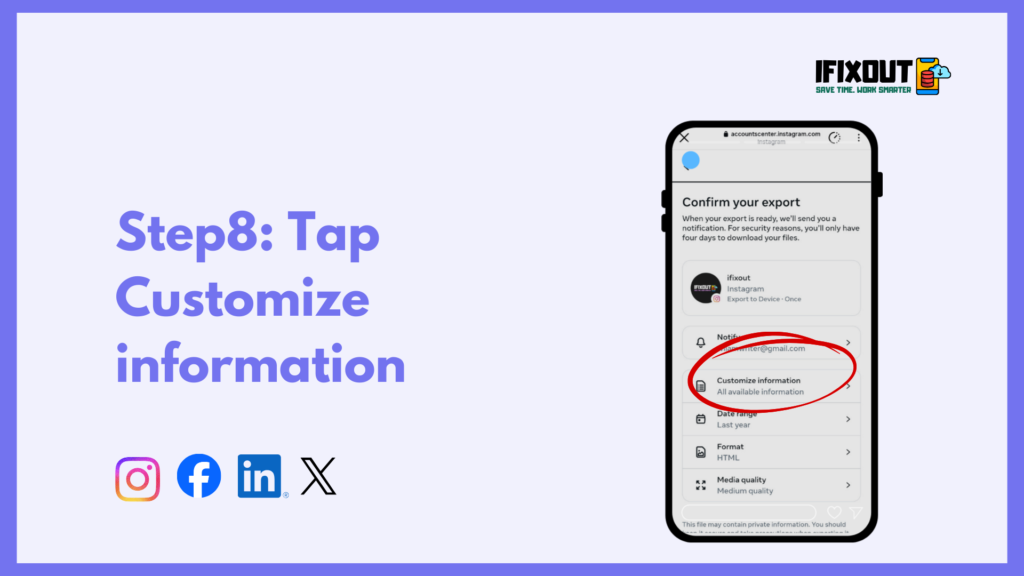
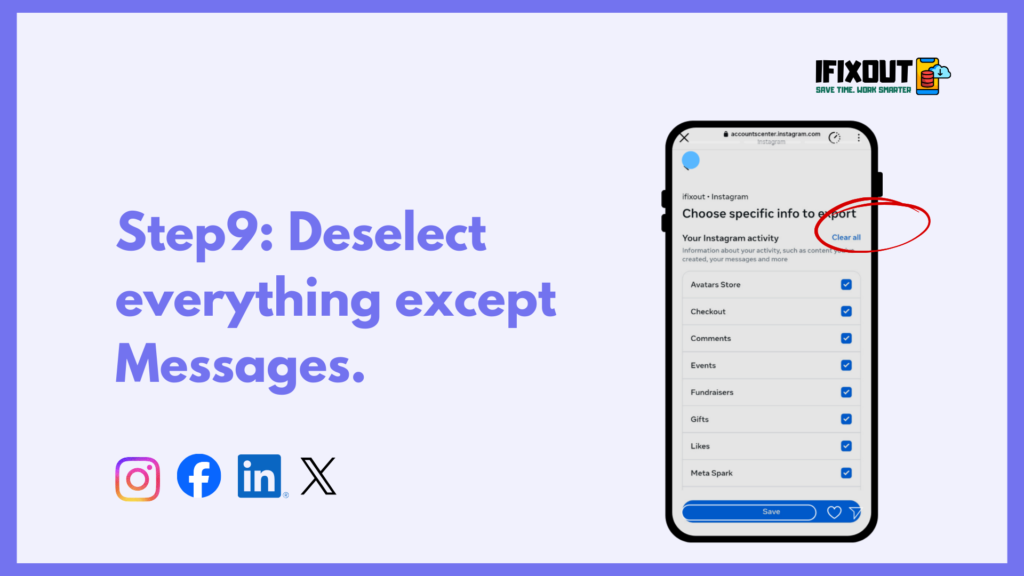
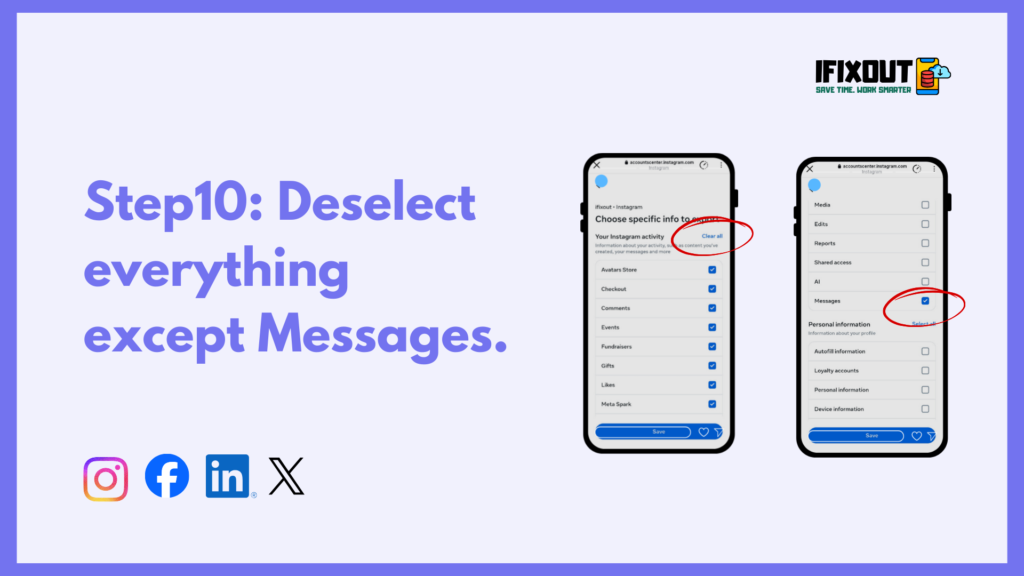
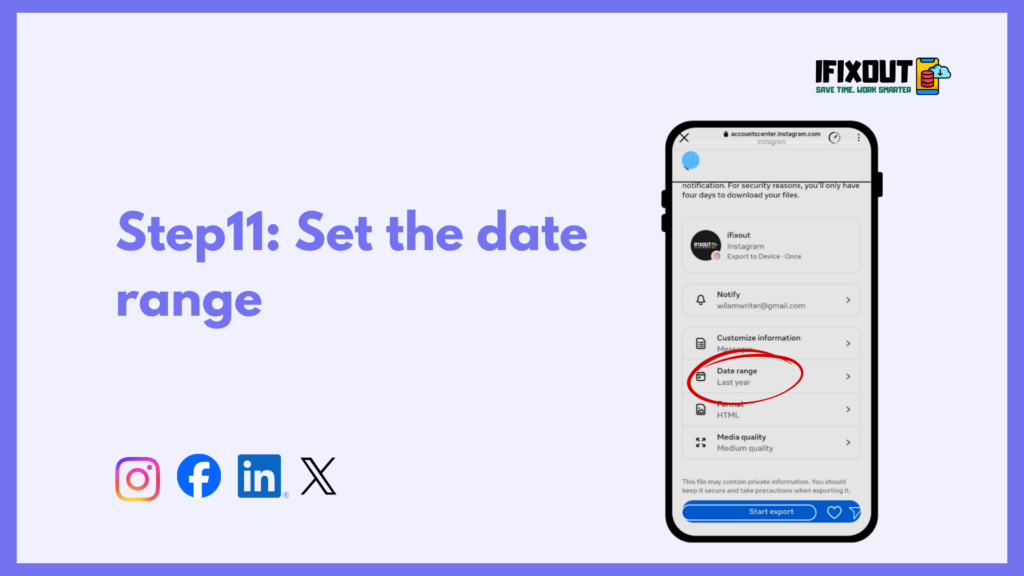
This ensures your downloaded file is focused only on messages and keeps the size manageable.
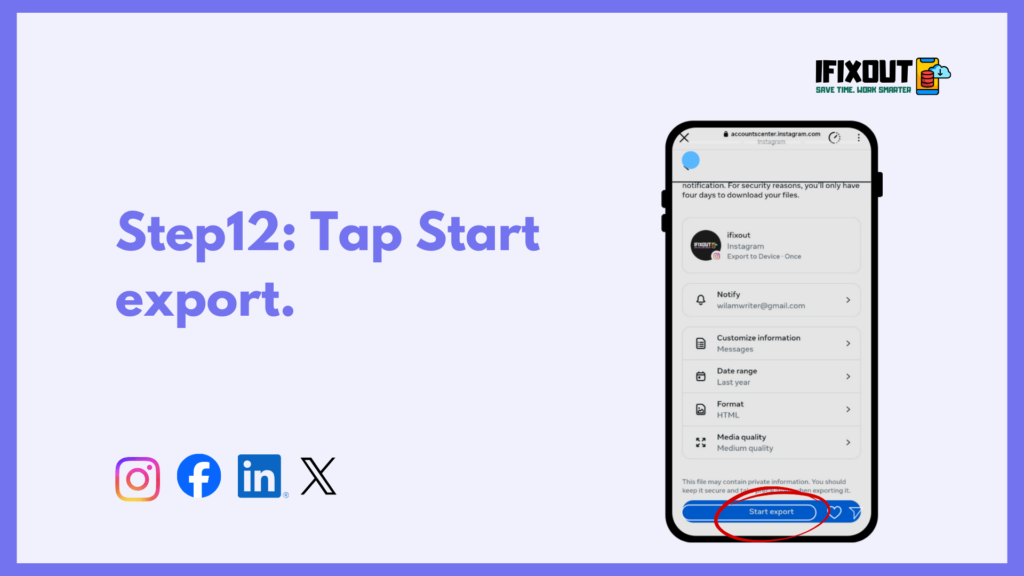
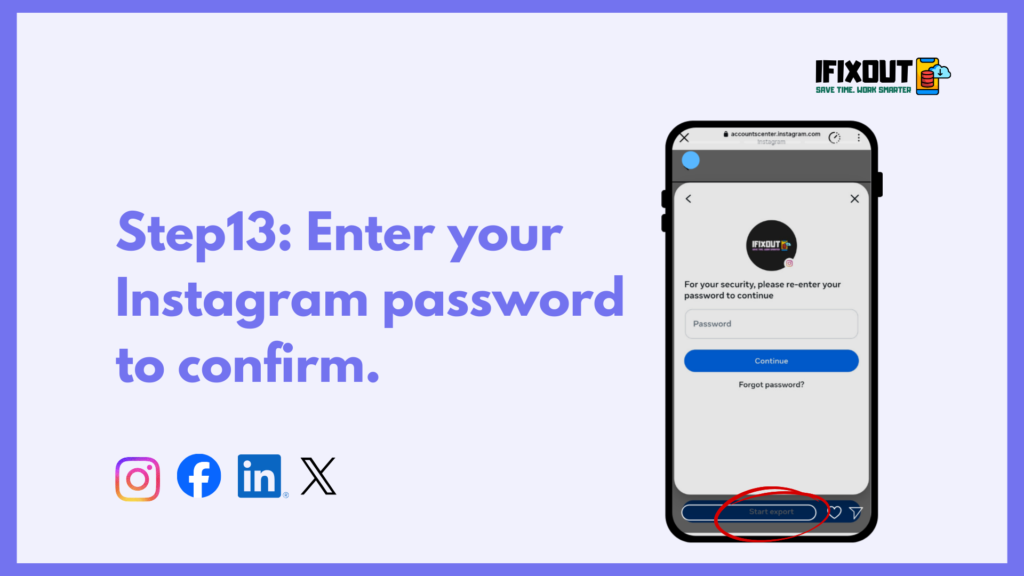
The preparation time can range from a few minutes to up to 48 hours, depending on the size of your account and messages.
The ZIP file contains all your selected data, including messages, stored in a structured folder.
Most devices allow you to extract files natively; if not, a free file manager app can be used.
Here, you can view all inbox messages, message requests, and conversations, including deleted chats — if they are still stored in Instagram’s data archive.
If a chat does not appear, it may have been permanently deleted and cannot be recovered.

To understand message recovery, it helps to know how Instagram manages your data. When you send or receive messages on Instagram, they are stored on Instagram’s servers. When you delete a conversation from your inbox, it removes the visible chat from your account interface. However, in some cases, message data may still remain stored in the account archive for a certain period.
Instagram provides users with access to their stored data through the “Export Your Information” feature. This feature allows you to download a file containing your activity, including photos, comments, profile information, and direct messages.
It is important to understand that if a message is permanently removed from Instagram’s servers, even the export feature will not retrieve it. The data export method works only if the message still exists within Instagram’s stored account records. This is why timing can sometimes matter when attempting recovery.
It is important to manage expectations. Not all deleted messages can be recovered. If the conversation has been permanently removed from Instagram’s archive system, the export file will not contain it. This usually happens if the deletion occurred long ago or if the data has already been cleared from storage.
Additionally, if both you and the other person delete the conversation, there is no accessible backup available through Instagram. The platform does not provide users with server-level access or administrative recovery tools. Customer support typically cannot restore personal deleted messages either.
If your exported data does not include the deleted chat, it means recovery is not possible through official means. In that case, your only option may be to ask the other participant if they still have a copy of the conversation. Being aware of these limitations can prevent unnecessary frustration and wasted time.
Many websites claim they can recover permanently deleted Instagram chats using advanced tools or hacking methods. These services often advertise “instant recovery” or “guaranteed results.” However, these claims are misleading and potentially dangerous.
Most third-party recovery tools require your Instagram login details. Providing this information can put your account at risk. Some of these services install malware, steal personal data, or compromise account security. In many cases, users end up losing access to their accounts entirely.
Instagram does not authorize any external app to access private message databases. If a tool claims to retrieve deleted messages from Instagram servers, it is likely a scam. The only safe and legitimate way to attempt message recovery is through Instagram’s official data export feature within the app. Avoid shortcuts that promise unrealistic results.

Since recovery is not always guaranteed, prevention is extremely important. If you use Instagram for business, customer communication, or important discussions, it is wise to create a backup strategy.
First, regularly download your account data using the export feature. Doing this every few months ensures you always have a stored copy of your conversations. Second, take screenshots of important chats that include payment confirmations, agreements, or critical details. Screenshots provide immediate backup and are easy to store securely.
For business users, consider moving serious discussions to email or another secure communication platform. Instagram direct messages are convenient, but they are not designed as permanent storage for contracts or legal agreements. Being proactive can save you significant stress in the future and prevent permanent loss of valuable information.
Recovering deleted Instagram chats is possible in some cases, but only through Instagram’s official data export method. There are no hidden tricks, secret hacks, or reliable third-party tools that can restore permanently deleted messages. If the conversation is still stored in your downloadable archive, you can view it after exporting and extracting the file. If it is not included, then unfortunately it cannot be recovered.
The best approach is to stay calm, follow the official steps carefully, and avoid risky recovery apps. More importantly, take preventive measures by backing up important conversations regularly. Smart digital habits can save time, reduce stress, and protect valuable information in the long run.
No, Instagram does not provide a restore button or recovery feature within the messaging interface. Once a chat is deleted from your inbox, it cannot be restored directly through the app’s normal settings.
Instagram does not publicly state an exact timeframe for message storage. Some deleted chats may still appear in exported account data, but there is no guarantee. Permanently deleted messages may be removed from servers over time.
Possibly, but only if they remain stored in Instagram’s archive data. If the exported file does not contain the conversation, recovery is not possible.





Leave a Comment